

How to Fix AI Copy That Feels Stiff and Corporate
Introduction
I see this all the time. Business owners start using AI to help with their writing, feel quite pleased with the speed of it, and then hit the same wall. The copy is technically fine. The grammar is clean. The points are there. But it sounds like it was written by a very confident stranger who has never met you or your customers.
That stiff, corporate tone is one of the most common frustrations people have with AI copy. It reads smoothly, but it does not feel like you. And if it does not feel like you, it usually does not land with your audience either.
I want to show you how to fix that. I will walk through why AI defaults to formal, generic language and what you can do to shift it. Nothing complicated. Just practical adjustments that help you get usable copy without spending hours rewriting everything.
When AI copy falls flat, it is rarely because AI is useless for marketing. It is usually because the instructions were too vague. Most people underestimate how specific they need to be. The good part is that this is fixable.
Key Takeaways
- AI produces stiff copy by default because it is trained to be broadly acceptable, not specific to my voice, my audience, or my context. Vague prompts produce vague results.
- Giving AI a clear description of who I am writing for and how I normally sound makes a noticeable difference to the output I get back.
- Showing AI examples of my existing copy, even just a few sentences, gives it a reference point that improves tone more reliably than trying to describe my style in abstract terms.
- Editing AI output is faster than writing from scratch, but it still needs editing. When I treat the first draft as a starting point rather than a finished product, I save myself a lot of frustration.
- Small prompt adjustments, like specifying the format, the audience, and the tone in the same instruction, tend to produce more usable copy with fewer rounds of back and forth.
The good news is none of this requires technical skill. Once I understand where the stiffness comes from, I can correct it. And after that, AI becomes a tool I control, not something I fight with.
Does Your AI Copy Sound Stuck in Beige Corporate Soup?
If you’ve ever read back a piece of AI-generated content and thought, “Why does this sound like it was written by a committee in 2019?” — you’re not wrong. I hear this constantly. Business owners staring at perfectly “fine” copy that technically says the right things… but feels stiff. Flat. Like no actual human had a pulse while writing it.
That’s not the tool failing you. That’s a prompt problem.
The Real Reason Your AI Output Sounds Generic
Here’s what’s really going on. When you give AI a vague instruction, it fills in the blanks with the safest possible version of what you asked for. Average tone. Average structure. Average vocabulary. The statistical middle of the road.
And the middle of the road is beige.
So you end up with that distinctive corporate soup. Polished enough. Correct enough. Completely forgettable. Definitely not you.
A lot of the “how do I fix corporate sounding AI text?” conversation focuses on settings, plugins, switching platforms — as if the next tool will magically inject personality. Maybe sometimes. But usually? It’s simpler than that.
You haven’t given it anything personal to work with.
Why Voice Matters More When You’re a Solopreneur
If you run a bigger business, slightly generic copy is irritating but survivable. For solopreneurs and small business owners, it’s different. Your voice isn’t decoration. It’s the thing.
People buy from you partly because of how you think. Your warmth. Your sharp edges. The way you explain something in a sentence that just clicks. Strip that out and replace it with corporate handbook energy, and the connection quietly disappears.
To make AI content feel personal, you have to feed it personal material. Your actual opinions. The phrases you genuinely use. The way you’d say this in a voice note, not a board meeting. I think a lot of people skip this because it feels fiddly. Or a bit self-indulgent. It isn’t.
And here’s the uncomfortable question. If someone read three pieces of your content back to back, would they know it was you? Properly you. Or could it have come from anyone in your industry selling something vaguely similar?
If you hesitate on that… there’s your starting point.

Borrow My Voice: Transcribing Your Personality into AI Prompts
If you’ve ever read AI-generated content and thought, “This sounds nothing like me,” you’re not being picky. You’re spotting the gap. The gap between default AI and your actual voice. And that gap is exactly why so many business owners end up rewriting half of what the tool gives them before it even gets near the publish button.
It’s not dramatic. It’s just… flat. And you can feel it.
Why AI Defaults to Corporate-Sounding Text
AI tools are trained on massive volumes of written content, and a lot of that content is formal, polished, and carefully neutral. That’s not a flaw. It’s just how the data leans.
So what do you get? Technically correct copy that feels oddly bland. The kind of writing that’s trying very hard to be helpful, but could belong to absolutely anyone. It feels “personal” in the way a form letter feels personal.
The tool isn’t broken.
It’s just responding to what you give it.
The Simplest Fix: Record Yourself First
Here’s the part most people skip because it feels too obvious.
Before you write a single prompt, record yourself talking about the topic out loud. Just talk. As if you’re explaining it to a client or a friend. No script. No bullet points. No overthinking.
That recording? That’s gold.
It has your rhythm. Your phrasing. The way you double back to clarify something. The order your brain naturally explains things in. None of that exists when you’re staring at an empty prompt box trying to sound “clear”.
Once you’ve got the recording, you’ll need it in text form. Tools like Fireflies or Sybil do that quickly. Not glamorous. Not revolutionary. Just practical. You’re not adopting a whole new system — you’re removing the friction of typing out what you’ve already said.
Take the transcript and paste it straight into your AI prompt as context. Tell the tool: “This is how I naturally explain this. Match this tone and style.”
The shift is usually immediate. Not perfect, but closer. And closer matters.
A lot of business owners find this one step does more for “human-sounding” AI than endless editing ever does. Because you’re not patching up stiff copy after the fact. You’re stopping it from going stiff in the first place.
And there’s something else here that’s easy to miss.
When your audience reads your content regularly, they build a picture of you. A sense of your voice. Your cadence. If that shifts slightly every time because each AI session starts from scratch, that trust softens. Maybe not dramatically. But gradually.
Feeding AI your transcribed speech anchors it. It gives the tool something consistent to come back to.
Also — and this matters — your recording doesn’t need to be polished. You can ramble. You can correct yourself. You can pause and rethink mid-sentence. In fact, that’s useful. The slight messiness is often the thing that makes it sound like you. And if we’re honest, most of us don’t speak in tidy LinkedIn paragraphs.
The practical next step is simple. Pick a topic you’ve been meaning to write about. Record yourself talking it through for two or three minutes. Drop the transcript into your next prompt. Compare the output to what you usually get.
That’s it.
No new strategy. No big overhaul. Just one small shift that, in practice, changes quite a lot.

Ban These AI Hallmarks from Your Content
If you want to sort out AI copy that feels stiff, start by spotting the patterns that give it away. AI has a handful of favourite moves and once you clock them, you really can’t unsee them. They’re everywhere. And they’re quietly making your content sound like it was signed off by a committee.
The Giveaways That Make Readers Switch Off
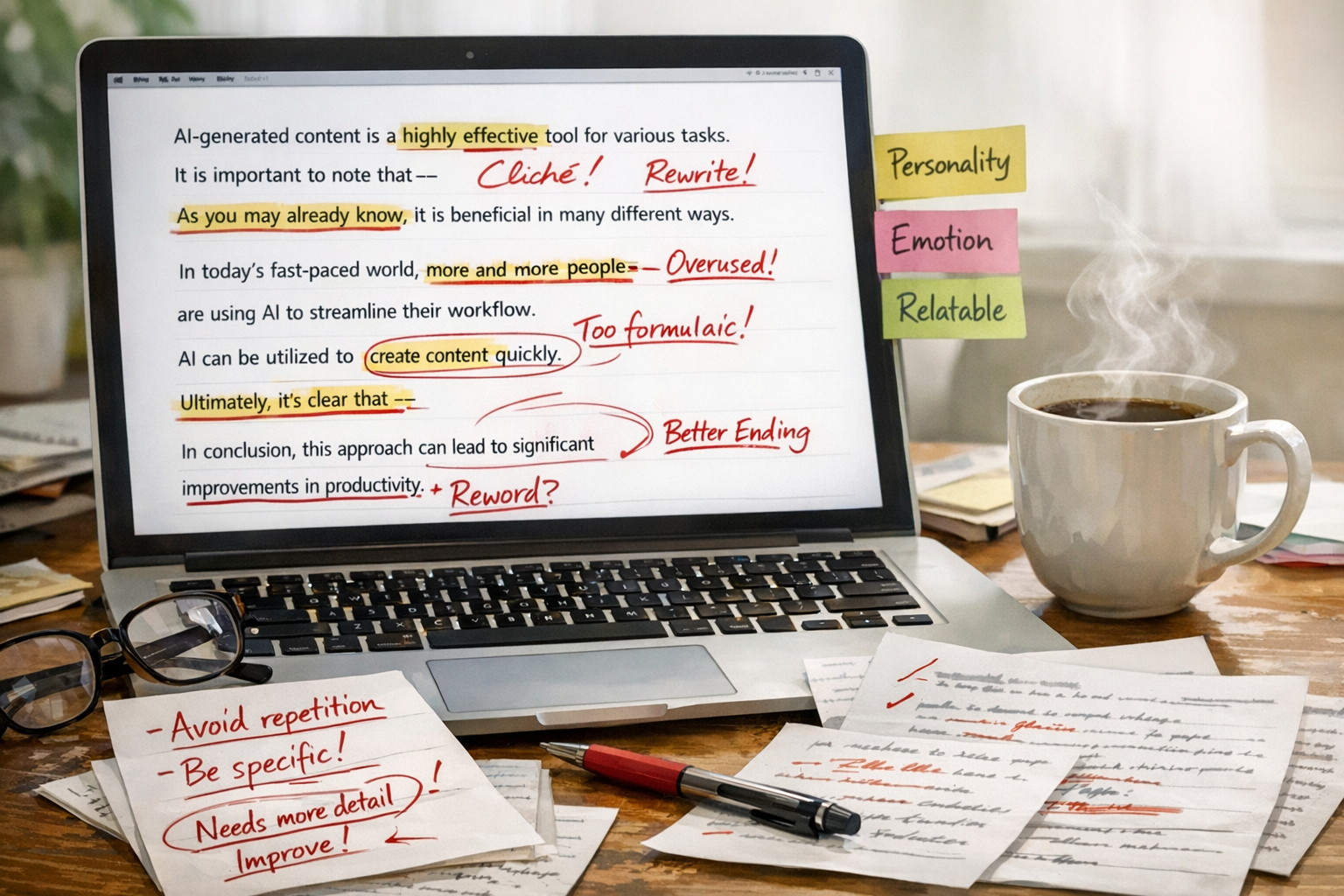
The em dash is the current AI calling card. You’ll see it dropped into sentences – like this – where a full stop would have done the job perfectly well. It’s not technically wrong. But when it shows up every other line, the whole thing starts to feel overly formal and slightly out of breath.
Then there are the formulaic openers. “In today’s fast-paced world…” or “It’s important to note that…” These phrases don’t actually say anything. They’re filler dressed up as insight. It’s what AI defaults to when it’s trying to sound credible instead of just being useful.
Here are the most common AI hallmarks worth cutting on sight:
- Overused em dashes where a full stop or comma would be cleaner
- Transitional padding like “it’s worth noting” or “this is particularly true when”
- Perfectly balanced three-point structures that feel rehearsed rather than real
- Vague adjectives like “robust,” “seamless,” and “cutting-edge”
- Sign-off lines that summarise what you just said, word for word
How to Add the Human Edit Layer
Once you’ve cut the clutter, that’s where the real work starts. And this is the bit people skip. It’s not just about sanitising AI copy, it’s about putting yourself back into it. Ask what you’d actually say to a client sitting across from you. Then write that.
Storytelling doesn’t have to mean some long, dramatic anecdote. It can be one specific detail. One honest line. One moment of “this is what I’ve actually noticed”. That’s usually enough. It grounds the content in something real, instead of something generated.
The human edit layer isn’t about rewriting everything from scratch. It’s reading each paragraph and thinking, would I genuinely say it like that? If the answer’s no, change it until it sounds like you. That one habit will fix more corporate-sounding AI text than any clever prompt tweak ever will.
Right now, pull up a piece of content you’ve drafted with AI. Read it out loud. Notice where you cringe a bit. Rewrite just those lines in your own voice. It won’t take long. And the difference is immediate.
Structured Workflows to Humanize AI Copy: Simple Steps, Big Results
If you’re trying to fix AI copy that feels stiff, the issue usually isn’t the tool — it’s that there’s no actual process behind it. Most business owners open a chat window, type something vague, and cross their fingers. That’s not a workflow. That’s a gamble.
Treat AI Like a Brilliant Intern, Not a Ghostwriter
Here’s the shift that changes everything: AI doesn’t know your business, your tone, or your customers — you do. Full stop. Think of it as a smart intern who needs a proper brief before they can do anything useful. When you stop expecting it to replace your thinking and start using it to extend your thinking, the output improves. A lot.
And this isn’t just a neat metaphor. It’s the reason so much AI content feels flat and generic. People are asking the tool to do the entire job. Strategy, tone, judgement, nuance — all of it. That’s your job. AI is brilliant at drafting, structuring, and iterating. It is not the brand brain. When you blur that line, the copy suffers.
A Five-Step Framework to Improve AI Generated Content Consistently
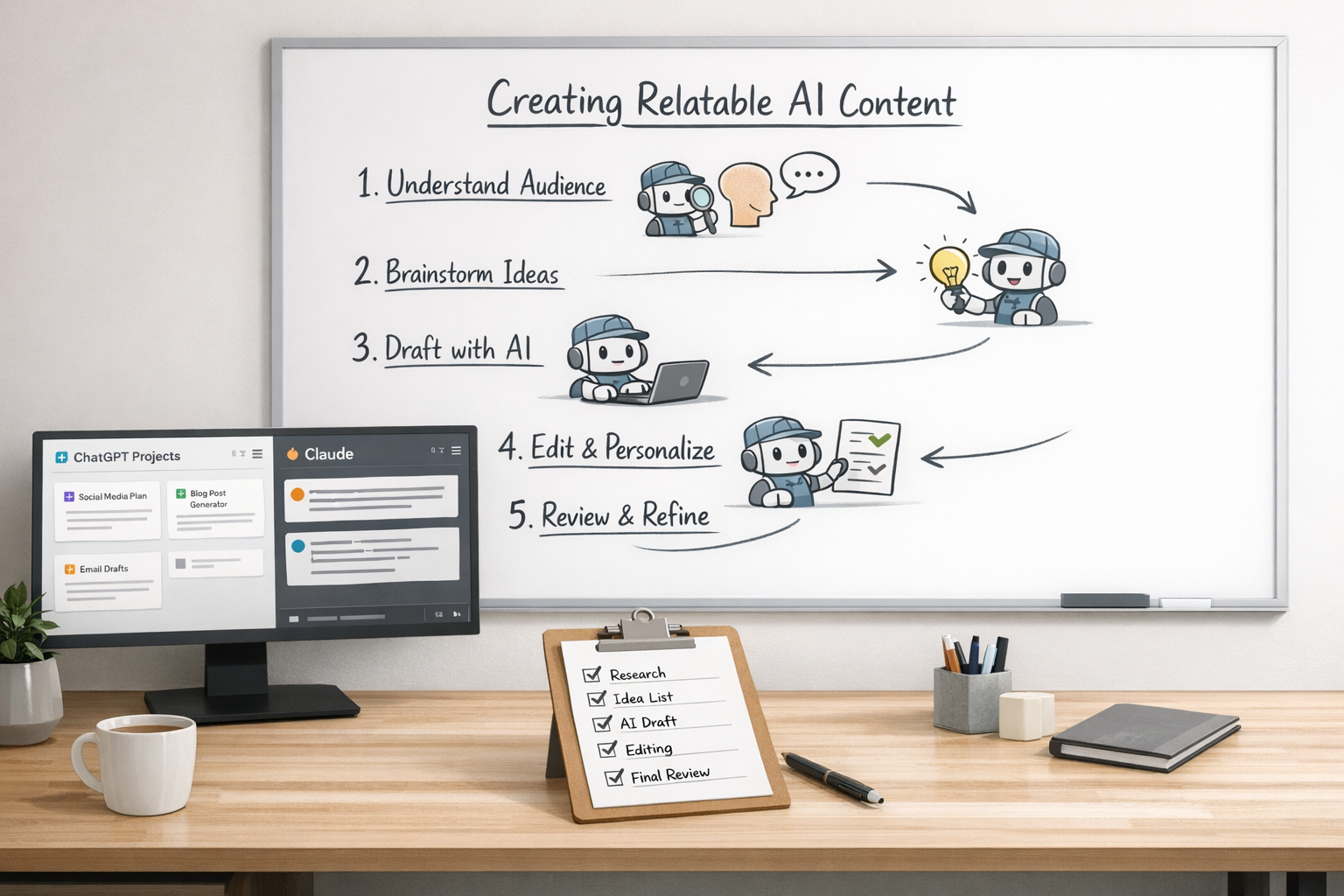
Here’s the simple framework I use to make AI writing sound human — without it turning into a part-time editing marathon:
- Step 1 — Voice brief first. Before you type a single prompt, define your tone in normal human language. How you speak. What you never say. What your audience expects when they hear from you.
- Step 2 — Give it context, not just a task. Don’t just say “write a post.” Say who it’s for, where it’s going, and what you want the reader to do next.
- Step 3 — Draft, don’t publish. The first output is a rough draft. Always. Treat it like one.
- Step 4 — Edit for personality. Read it out loud. If it sounds stiff or slightly “corporate spokesperson,” change it. Swap the clunky phrases. Put your rhythm back in. Inject personality into the AI copy on purpose.
- Step 5 — Save what works. When a prompt or editing pattern works well, document it. That’s the start of a system.
Why does this work? Repetition. The first few times might feel deliberate. Maybe even a bit slow. But once you’ve done it a handful of times, it becomes automatic. It stops feeling like you’re fixing AI and starts feeling like you’re running a reliable engine.
Build a Repeatable System With ChatGPT Projects or Claude
Ad hoc prompting is where consistency goes to die. If every session starts from zero, of course the tone is going to wobble. Tools like ChatGPT Projects and Claude let you store context, instructions, and tone notes — so you’re not rebuilding your brand brain every single time. This is how you fix corporate-sounding AI text at the root: you design the setup properly.
ChatGPT Projects allow you to save custom instructions and files inside a persistent workspace. So your tone brief, audience notes, brand language — they’re already there when you start. Claude is particularly strong with longer context windows, which is useful if you’re working from detailed briefs or bigger pieces of content. Neither is magic. I think that’s important to say. But both become far more powerful when you’ve built some structure around them.
The goal isn’t perfect AI output. It’s a consistent starting point. Something solid enough that you’re refining, not rewriting. When you make AI content feel personal through a system — not just willpower and endless tweaks — it sticks. It sounds like you. Not a press release drafted by committee.
Want to build this without the guesswork? I’ve put together a simple downloadable checklist that walks you through setting up your own voice framework — the prompts, the questions to ask yourself, what to save for next time. It’s practical. Clear. No fluff. Grab it below and start turning your AI drafts into something that actually sounds like you.
Download link:
https://example.com/download-checklist
The Reality Check: AI’s Limits and the Essential Human Touch
If you’ve been wrestling with AI copy that feels stiff or slightly… off, you’ve already seen the issue. AI doesn’t actually know your business. It knows patterns. Averages. The most statistically likely next word. And that’s exactly why so much AI content sounds like it was written by someone very confident who’s never had a real conversation with a real customer.
Why AI Tools Hit a Creative Ceiling
Tools like Gemini and Copilot are genuinely useful. I’m not anti-AI. They’re brilliant for getting a rough draft out of your head and onto the page. That part? Fast. Efficient. Done.
But they’re working from prompts, not from the lived texture of your brand. Not the way you naturally explain things. Not the phrases your clients actually use. Not the tone that makes someone think, “Yes, this is for me.” That gap is where the corporate stiffness sneaks in. And if we’re honest, no amount of clever reprompting fully fixes that.
This isn’t about ditching AI. It’s about being clear-eyed. AI handles volume and structure well. Humans handle nuance. Warmth. Perspective. And, crucially, the moments where someone decides whether they trust you enough to click, book, buy or reply. That bit still needs you. I don’t think we’re replacing that any time soon.
The Fix Isn’t a Better Prompt — It’s a Better Process
A lot of business owners obsess over writing the perfect prompt, as if that’s the magic lever. Sometimes it helps. Often, it doesn’t. The smarter move is building human review into the process at the end.
Think of AI as a strong first-draft engine, not a finished copy service. What makes AI writing sound human isn’t a fancier instruction. It’s you reading it out loud, wincing at the weird bits, and rewriting the sentences that don’t sound like you. Slightly clunky? Good. That means you noticed.
There are a few simple habits worth baking in:
- Read every AI draft aloud before publishing — your ear catches what your eye skips
- Replace any phrase you’d never say in conversation with one you actually would
- Check that your specific point of view appears somewhere in the copy, not just generic advice
- Look for passive constructions and turn them into direct, active sentences
- Ask yourself: does this sound like my brand, or does it sound like every other brand?
If you want AI copy to feel personal, you don’t need to overcomplicate it. You don’t need an intense rewrite every time either. For high-stakes sales pages, yes, bringing in proper copy support can make sense. But for everyday content, a focused fifteen minutes of human editing often does more than an hour of fiddling with prompts.
The businesses making AI feel personal aren’t the ones chasing better shortcuts. They’re the ones treating AI as a starting line. Build a review step into your process — even if it’s just ten minutes before you hit publish. You’ll feel the shift. And so will everyone reading it.

Sources:
SweetPilot (SweetPilot, 2026)